

You may have used, or at least heard of, the Google Analytics User Lifetime Exploration report. In this guide, I won’t be explaining how to create the report or how to read it. Instead, I’ll be taking a different approach.
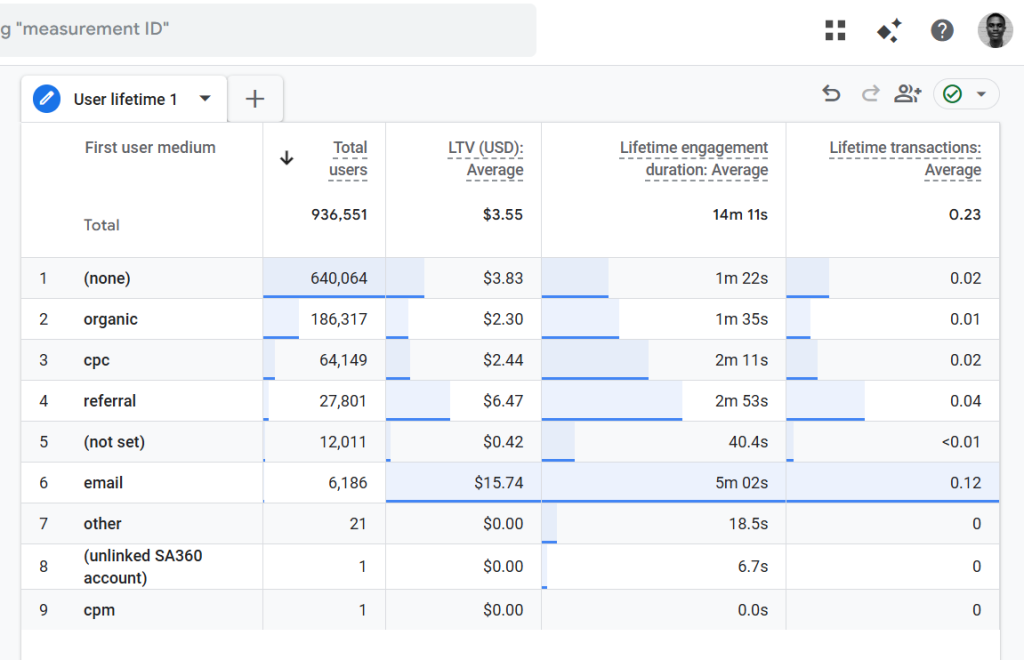
Here is what I’ll be doing instead, what other articles don’t talk about.
In this article, I will share key considerations to review before using this report, along with often-overlooked points, so you can get the most value from it.
The Google Analytics GA4 User Lifetime Exploration Report
The Google Analytics 4 (GA4) User Lifetime report is a powerful tool for analyzing user behavior and value over the entire lifetime of a “customer”. It helps you understand what that value looks like, where it comes from, and whether it truly exists in your data.
The User Lifetime Exploration technique in GA4 shows how “users” (you see I have “user” in quotes, more on that) behave throughout their lifetime as customers of your website or app.
The keyword here is users, which I translate as customers (more on that later in this guide), which is why I consider this report to be more customer-focused than many other GA4 reports.
Within your Google Analytics property, the User Lifetime reporting technique is designed with the intention to help you uncover learnings from your data, such as:
- The source, medium, and campaign that acquired users with the highest lifetime revenue, compared to revenue generated only within a selected month.
- The active marketing campaigns acquiring users who are predicted to be more valuable, with higher purchase probability and lower churn probability, based on GA4’s predictive models.
- Unique behavioral insights, such as when monthly active users last made a purchase on your site or last engaged with your app
However, most people jump straight into creating this report and presenting insights to clients without first asking and answering critical questions (mostly overlooked) that determine whether the report can be trusted and whether it is delivering its full potential.
That is exactly what I’ll be covering in this article.
First, I want to clarify that I do not recommend using the GA4 User Lifetime exploration report as your primary option for lifetime analysis. I’ll explain why later in this guide.
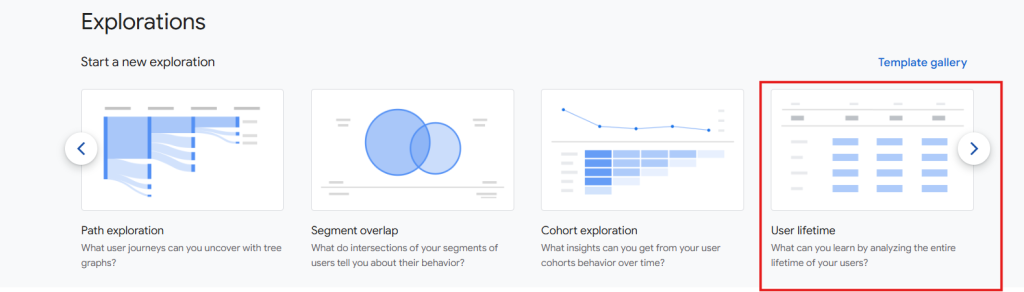
And I strongly recommend reading that section as well, as it will help bring additional clarity before relying on the Google Analytics User Lifetime Exploration report.
That said, if you choose to use this report, it’s essential to ask the following questions beforehand:
- Are you tracking purchases, and are they implemented correctly?
- Are you tracking recurring payments (for subscription-based websites)?
- Do you have proper user identification management in place?
- Do your data retention settings support lifetime analysis?
- Are there any attribution issues affecting your data?
- Is user-provided data enabled (what does this even mean)?
- Is your dataset beyond the sampling threshold?
- What reporting identity is your Google Analytics property using?
I’ll explain shortly how each of these factors affects the quality and reliability of the insights provided by the GA4 User Lifetime report.
In addition, I’ll share other essential considerations you should keep in mind when using this report.
1. Are You Tracking Purchases Correctly?
The first item on the list focuses on whether purchases are being tracked correctly in your Google Analytics property.
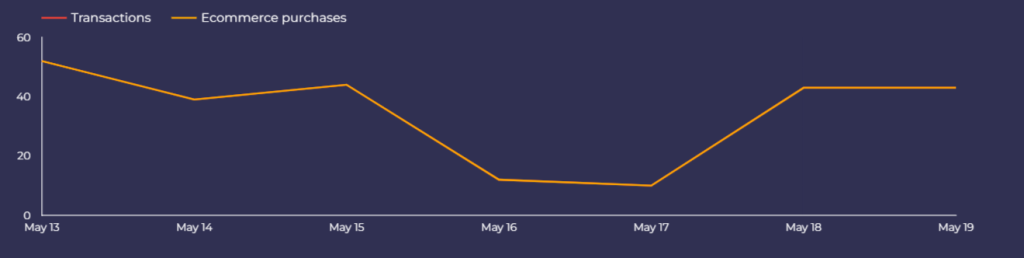
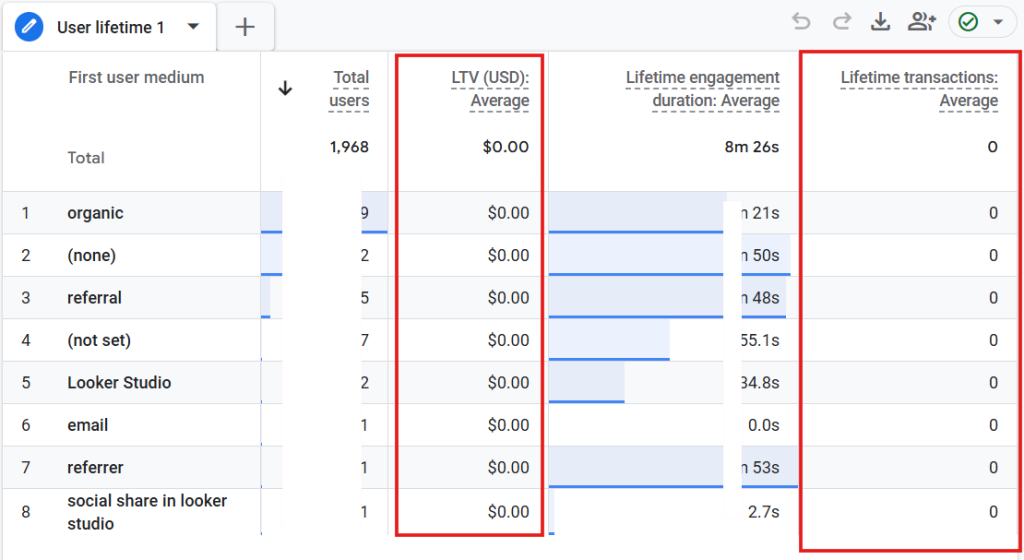
This is a critical requirement. If purchase events are not being tracked, GA4 cannot calculate revenue-based or monetary value for your users.
As a result, you won’t be able to identify which marketing channels are driving long-term user value.
When purchases are missing, the User Lifetime report will contain no meaningful monetary data. Metrics such as Average Lifetime Value (LTV) and Average Lifetime Transactions will not be populated, making the report largely ineffective for business analysis.
Even if purchases are being tracked, it’s equally important to confirm that the implementation is correct. GA4 purchase tracking is prone to several common issues, any of which can significantly distort your lifetime value insights.
I cover these mistakes in detail in my Google Analytics (GA4 audit) article.
2. Are You Tracking Recurring Payments? (For Subscription-Based Websites)
Beyond standard purchase tracking, subscription-based businesses must also measure recurring payments to obtain an accurate and reliable Lifetime Value (LTV) analysis.
To truly understand which acquisition channels generate the highest long-term value, you should not stop at tracking one-time purchases. Recurring revenue events must also be captured.
This is essential because the LTV metric in GA4 is calculated as the total of the following events, minus any refund events:
- purchase
- in_app_purchase
- app_store_subscription_renew
- app_store_subscription_convert
If any of these revenue-related events are missing, your LTV calculations will be incomplete and invaluable.
3. Do You Have User Identification Management in Place?
This is another critical component of the User Lifetime Exploration report. Because the report is user-based, a reliable method of identifying and recognizing the same user over time and across different devices is essential.
If your website does not have an authentication experience or a mechanism for assigning a unique user identifier that aligns with your backend systems, the insights from the GA4 User Lifetime Exploration report will be limited in quality and reliability.
In such cases, GA4 falls back to device-based identification, specifically the Client ID, which relies on browser cookies. While this method works to an extent, it comes with well-known limitations, including cookie expiration, cross-device usage, and privacy restrictions, all of which reduce quality/accuracy in lifetime analysis.
When User-ID tracking is properly implemented in your GA4 property, Analytics uses the User ID (when available) to identify users and unify all associated events across sessions and devices in reports and explorations. If no User ID is collected, GA4 instead uses a device identifier, either the Client ID for websites or the app-instance ID for apps.
Additionally, when a user has both signed-in and unsigned-in activity within the selected report date range, the User Lifetime Exploration report includes only the signed-in portion of that user’s data.
This approach exists to provide a more accurate representation of user behavior: user counts are not duplicated, and metrics such as Average Lifetime Value (LTV) are more precise. However, any activity that occurs while the user is not signed in is excluded from the exploration.
Apart from configuring user ID tracking for your analytics property, ensure it is implemented correctly, as errors can occur during the setup process in Google Analytics.
Even if you’ve properly implemented User-ID tracking, the reporting identity configured for your analytics property still plays a major role in the quality of insights you’ll get. I shed more light on this as you keep reading.
4. Do Your Data Retention Settings Support This Report?
Your GA4 analytics property’s data retention settings can significantly impact the depth and accuracy of analysis available in the User Lifetime Exploration report.
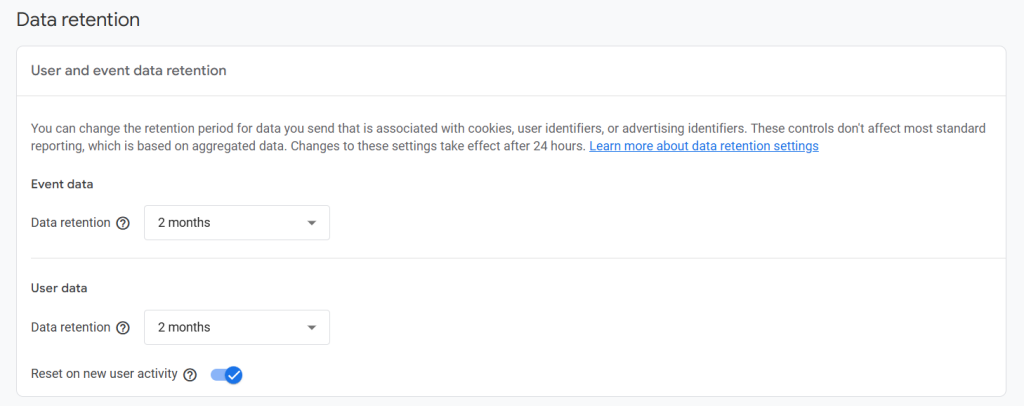
This is because the exploration relies on raw event-level data, and the duration for which this data is available depends entirely on your property’s data retention configuration.
For example, if your data retention is set to only two months, the usefulness of this report will be severely limited. Even with a 14-month retention period, quality insights does not automatically guarantee quality insights; you must also review whether the “Reset user data on new activity” setting is enabled.
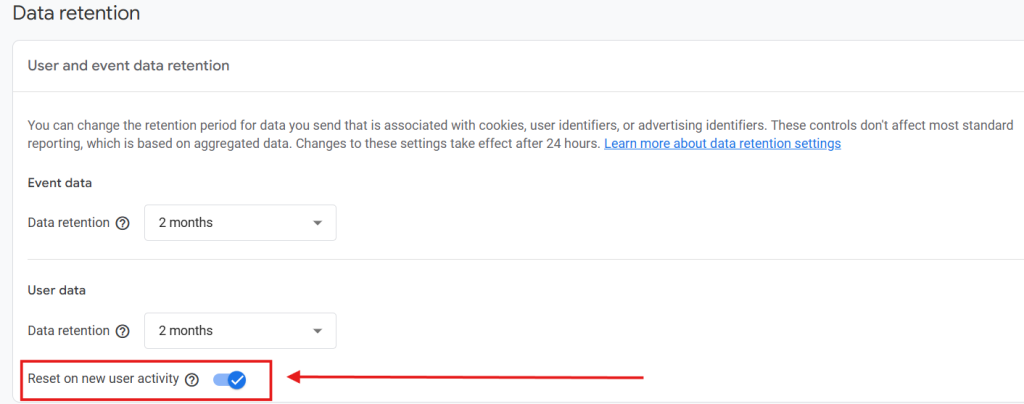
When this option is turned on, the retention period for a user identifier is reset every time the user generates a new event.
In practice, this means that if data retention is set to 14 months and a user returns at least once every month, their user identifier is continually refreshed and never reaches the expiration threshold. If the user does not generate any website or app activity before the retention period ends, their data is deleted.
If this option is turned off, the user’s data is automatically deleted once the retention period expires, regardless of any new activity.
It’s important to note that this reset feature applies only to user-level data.
In many cases, both the retention period and the reset-on-activity setting may have minimal impact if User-ID tracking is fully implemented, since GA4 prioritizes signed-in user activity when both signed-in and unsigned-in sessions exist for that user in the report data range. However, this assumption breaks down if users never sign in.
For websites where users frequently interact both while logged in and logged out, these settings can significantly influence the quality of analysis and the accuracy of insights derived from the GA4 User Lifetime Exploration report.
5. Do You Have Any Attribution Issues?
Having minimal or ideally no attribution issues is non-negotiable if you plan to rely on the Google Analytics User Lifetime Exploration report.
And this is because one of the primary use cases of this report is to help you understand the long-term value of acquisition channels, and inaccurate attribution undermines its core purpose.
If you have problems with UTM campaign tagging, missing or incorrect cross-domain tracking, or other attribution-related configuration issues, the learnings from the User Lifetime report will be unreliable. In such cases, you should avoid using this report altogether.
Relying on flawed attribution data means you are basing decisions on incomplete or incorrect information. Importantly, attribution issues are not limited to technical setup.
They can also stem from operational gaps, for example, when marketing teams fail to use UTM parameters consistently to provide proper context for incoming traffic. Without accurate UTM data, Google Analytics cannot assign correct attribution, which directly affects lifetime value analysis.
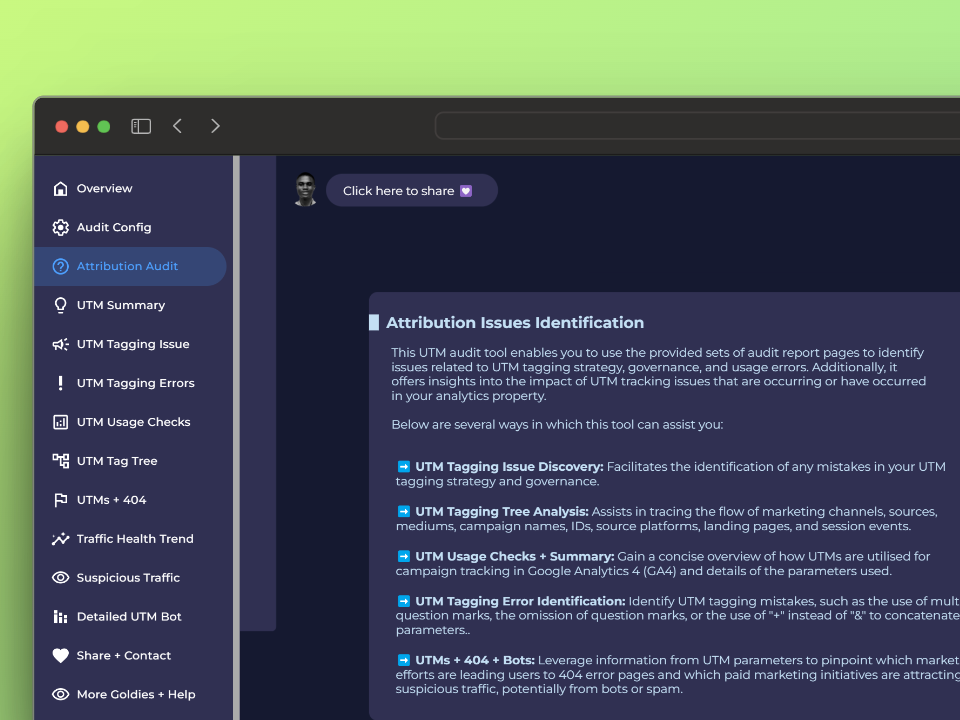
You can identify campaign and attribution issues by conducting a Google Analytics audit or using tools such as the free DumbData UTM Campaign Audit tool, which is specifically designed to detect UTM tagging problems.
6. Do You Have User-Provided Data Enabled?
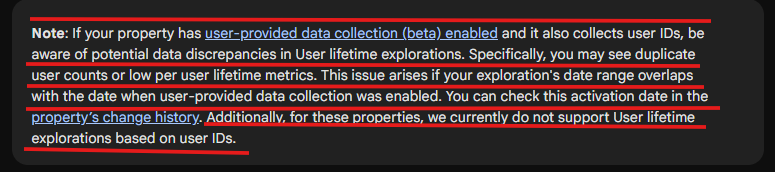
Google Analytics documentation for user lifetime analysis explicitly warns that enabling user-provided data requires caution, especially when User-ID tracking is also in place.
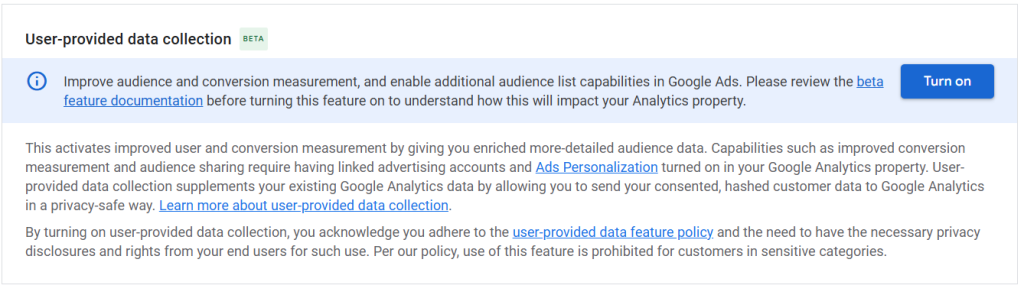
If your GA4 property has user-provided data collection (beta) enabled and also collects User IDs, you may encounter data discrepancies in User Lifetime Explorations. These issues can include duplicated user counts or unusually low per-user lifetime metrics.
This typically occurs when the date range of your exploration overlaps with the period during which user-provided data collection was enabled. You can verify the activation date by reviewing your property’s change history.
Additionally, for properties with user-provided data enabled, GA4 currently does not support User Lifetime Explorations based on User IDs, which further limits the accuracy of lifetime analysis.
This makes it another critical question to answer before relying on the report, as failing to do so may result in incomplete or misleading LTV insights.
7. Are You Beyond the Sampling Threshold?
This is the final consideration on the list and primarily affects websites with large volumes of traffic. There is little you can do to change this behavior, as it is inherent to how Google Analytics operates. However, being aware of it is essential when interpreting results and communicating insights to stakeholders or clients.
For the User Lifetime Exploration technique, the sampling limits are:
- 1 million users for the free version of Google Analytics
- 10 million users for the paid (GA4 360) version
When the selected date range exceeds these limits, Google Analytics applies a randomized sample of users (based on the applicable threshold) and then scales the results to estimate full population metrics.
While sampling does not invalidate the report, it can influence precision. Understanding this limitation helps you frame expectations and present findings more accurately.
Here’s a cleaner, more conversational rewrite of your section:
8. What Reporting Identity Is Your Property Set To?
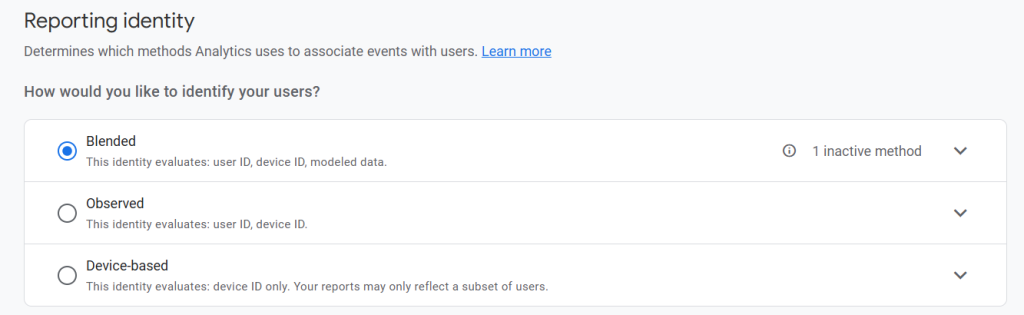
As I mentioned earlier, implementing User-ID tracking alone isn’t enough. The reporting identity configured for your GA4 property also has a significant impact on the accuracy and quality of the insights you get. I briefly touched on this before, but it’s worth exploring in more detail here.
Another major factor that affects the accuracy of your Google Analytics User Lifetime Exploration reports is the reporting identity setting you’ve chosen for your GA4 property.
You might be wondering: How exactly does this impact User Lifetime Explorations?
Here’s the simple explanation: the reporting identity you choose determines how GA4 identifies users and calculates lifetime value (LTV) related metrics within your explorations.
If your property is configured to use either Blended or Observed reporting identity, GA4 will prioritize the more reliable User-ID whenever it’s available. This allows Analytics to unify user interactions across sessions and devices, resulting in more accurate reporting and exploration data.
When a User-ID isn’t available, GA4 falls back to using device identifiers instead, such as the Client ID for websites or the App Instance ID for mobile apps, which are cookie-based and not that effective for scenarios where a user visits your website from different browsers or devices.
On the other hand, if your property is set to Device-based reporting identity, GA4 relies entirely on device identifiers to recognize users. In this setup, any collected User-IDs are ignored.
In practical terms, that means the User-ID tracking you worked hard to implement becomes largely ineffective for this type of analysis.
And honestly, this is one of the key reasons I don’t recommend relying solely on GA4 User Lifetime Explorations for customer lifetime value analysis, something I’ll cover in the next section.
Why I Don’t Typically Recommend Google Analytics for This Type of Analysis
The User Lifetime Exploration report in Google Analytics is a valuable tool. However, I generally do not recommend it as the default approach for lifetime value (LTV) analysis.
That said, in situations where you lack the necessary analytics infrastructure or resources to perform more advanced lifetime analysis or need to do a quick user lifetime analysis for marketing channel evaluation, the Google Analytics (GA4) user lifetime exploration report can serve as a practical alternative, provided you answer the questions I have covered in this guide.
The reason I don’t recommend GA4 as the primary solution for LTV analysis, either for organizations or clients, is due to several structural limitations.
First, GA4 user lifetime analysis is largely cookie-based. While this limitation is mitigated for websites that require users to log in before accessing content, it remains a significant challenge for most public-facing websites.
We no longer live in the early 2000s. Google Analytics requests can be blocked by browsers, ad blockers, or privacy tools, which means you often end up with only a partial view of the user journey. Even when a user’s initial visit is captured, subsequent interactions may not be, resulting in fragmented lifetime data. Additionally, consent requirements can significantly reduce the volume and quality of data available for analysis.
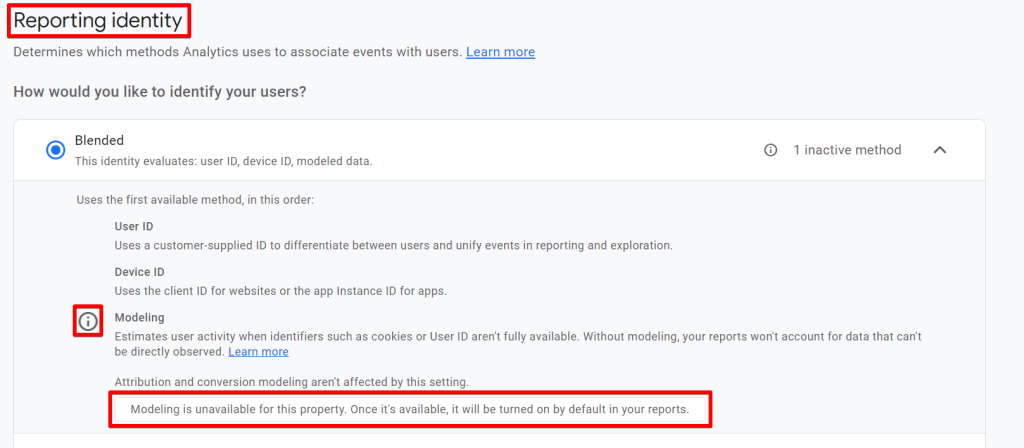
When a user does not grant consent, GA4 does not treat their data as observed data. Although Google Analytics applies behavioral modeling for unconsented users when advanced Google Consent Mode is implemented, this modeled data is not included in the User Lifetime Exploration report.
This limitation exists because GA4’s behavioral modeling currently does not support User Lifetime Explorations.
Another key reason I do not recommend GA4 for lifetime value analysis is the lack of flexibility in the reporting layer. You have limited ability to customize the data model, transformation logic, and reporting outputs, which restricts the depth and sophistication of analysis you can perform.
Conclusion
You should now have a deeper and more comprehensive understanding of the Google Analytics User Lifetime Exploration report and its role in lifetime value analysis.
More importantly, you now understand why it should not be your first option when conducting LTV analysis.
If you have already created this report for your business or clients using Google Analytics, you now have insight that goes beyond simply creating and reading the report. You are aware of the less obvious factors that can significantly impact the quality and reliability of the insights derived from this analysis.
With this understanding, you can more accurately interpret the results, communicate limitations clearly, and set realistic expectations with stakeholders and clients.
If you have any questions or need help with your measurement, Google Analytics (GA4) Audit, or have some project requests, feel free to reach out to me on LinkedIn or explore additional resources on the DumbData Measurement Resource Hub.